Refunding a Credit Card
Credit Card payments and refunds are linked to the folio letter in which they were processed (Folio A, B, C, etc.).
You can only refund a credit card up to the amount that has been charged on the folio. You can NOT refund a card which has not been charged previously.
Option 1:
-
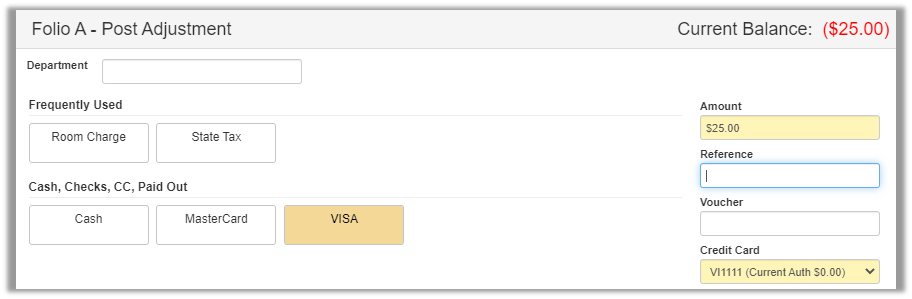
Access the reservation in question, click the folio option, and ensure you are in the correct folio tab (A through F; the All tab will process against the A tab) and click the Post Adjustment button.

-
Choose the appropraite department code for the card that needs to be refunded.
-
Enter the Amount to refund (do NOT enter a minus sign) and select the Credit Card from the drop down that was previously charged. Click OK a the bottom once everything is correct.
Option 2:
-
Access the reservation in question, click the folio option, and ensure you are in the correct folio tab (A through F).
-
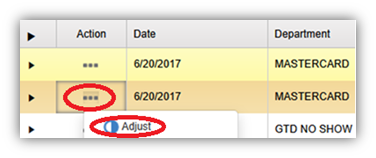
Click the Three dot action button next to the credit card payment you would like to refund all or part of and select adjust.
-
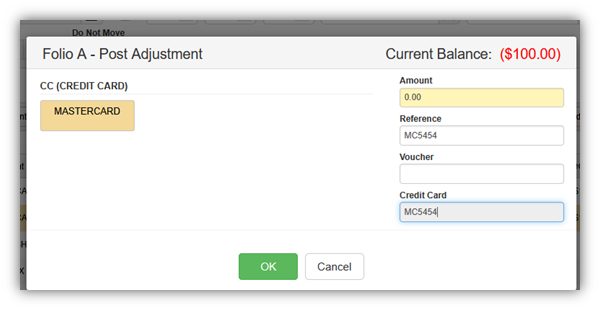
Input the amount you would like to refund; Credit Card will be auto selected based on the line item being refunded through the action button.
-
Click OK to process the refund to the credit card.
If the folio is now at $0, you can close it out. If the refund caused the folio to end with a balance, you will need to Adjust another account to offset the credit card refund.
*Example: If you refunded the guest for the wrong rate, you would then need to post an equivalent adjustment to the Room account (plus tax).
Once the current batch settles during the night audit, the refund will then be able to be seen by the customer. They may have to wait to access those funds depending on their bank's policies.
