Cancellations (Report)
Whenever a confirmed guest cancels their stay, Chorum automatically generates a cancellation record for the guest's booking as a confirmation they indeed cancelled. As part of the process, most properties include a set of "reasons," called cancellation codes, for staff to choose from most closely matching the guest's reason for cancellation (did they cancel because the rate was too high, because they had an emergency, etc). The reasons given for each cancellation are tracked on the Cancellations report, which can in turn be interpreted as a marketing tool used to identify trends among your cancellations.
Begin by accessing the Reports module, then beneath the Reservation Reports folder select Cancellation/Denial.
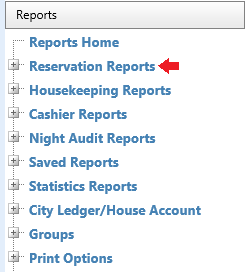
Note this report does not print the actual cancellation forms for individual bookings - you can only do so directly from the cancelled booking. Likewise, this topic does not discuss denials A term used to describe an incomplete booking. Opening a new booking then exiting before the booking has been saved and confirmed is considered a "denial." - see Denials (Report) for more information if needed.
The report lists all cancellations that occurred between the printed start and end dates, sorted either by arrival date or date of cancellation as set in the report's filter options.
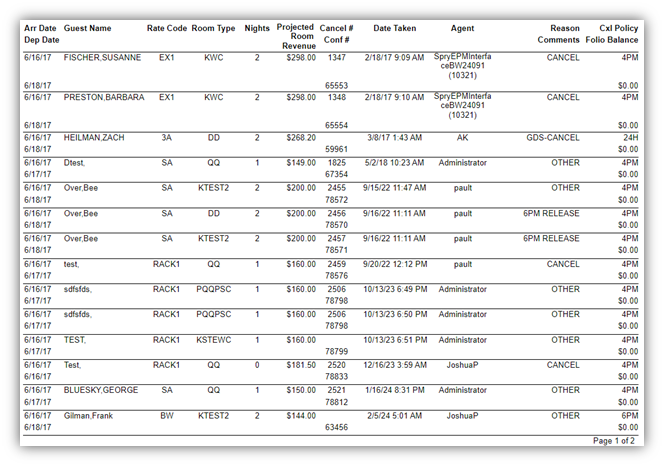
• Arr Date / Dep Date: The guest's original expected arrival and departure dates. The arrival is on top, departure on bottom.
• Guest Name: The guest's name as listed on the booking, using Last Name, First Name format.
• Rate Code: The guest’s booked rate(s).
• Room Type: The code representing the guest’s booked room type.
• Nights: The expected duration of the guest’s stay.
• Projected Room Revenue: The total estimated loss of revenue from this cancellation, calculated by adding together the booked rate for each night of the guest’s stay.
• Cancel # / Conf #: The guest’s cancellation number followed by their (PMS) confirmation number.
• Date Taken: The exact date and time the booking’s status was switched to cancelled. This time is based on the real time and date, not the business date.
• Agent: The user who handled the cancellations. If the cancellation was done via the CRS, the report will note the CRS.
• Reason Comments: If a detailed reason was given at the time of cancellation (in addition to choosing a cancellation code), it will be listed here.
• Totals by Reason: The total count of each cancellation code's usage will be listed here, with a sum total of all cancellations at the bottom of the box. This box is typically used to identify trends and attempt to correct / adjust their operations to improve customer retention.
• CXL Policy: The cancellation policy for the reservation.
• Folio Balance: The balance of the ALL tab for the reservation.
