In the below example, the report was printed for one day. Be aware that the 1-week and 1-month versions of the report strictly display available (unsold) rooms as a sum for each day of the week (or month, respectively), and do not show the detailed breakdown included in the 1-day report.
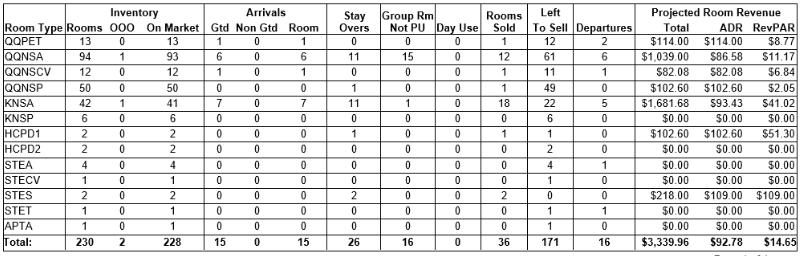
Expand the below options for an explanation of each column:
 Room Type The abbreviated code assigned to each room type in your hotel’s Chorum system.
- Inventory - Rooms The number of rooms associated with this room type. This value includes rooms presently out-of-order, sold, etcetera.
- Inventory - OOO The number of rooms presently marked as out-of-order for this room type. These rooms are “unsellable,” and won’t count towards or against your hotel’s projected room revenue values. See Maintenance Requests for more information.
- Inventory - On Market The number of sellable rooms associated with this room type, not counting OOO rooms.
- Arrivals - Gtd The count of Guaranteed reservations arriving on the printed report date. These are reservations that have set a guaranteed Hold Type. See Hold Type Setup for more information.
- Arrivals - Non Gtd All non-guaranteed reservations arriving on the printed report date. These are reservations with the hold type set to a non-guaranteed type (such as cash).
- Arrivals - Room The combined value of Gtd + Non Gtd reservations arriving for the day.
- Stay Overs Guests with a stay of two or more days, whose reservation is presently in-house on the printed date and not set to check out until a later date.
- Group Rm Not PU Short for “Group Room not Picked Up,” this represents blocks associated with a group contract that have not yet been converted to a group contract.
- Day Use Guests who are both arriving and departing on the same day are considered Day Use guests.
- Rooms Sold The number of bookings made (“sold”) today. This value does not account for complimentary rooms, no-shows, or non-picked up group reservations. The calculated total is then used to figure your hotel’s ADR beneath projected revenue.
- Left to Sell The number of rooms still available for booking under this room type. The value is calculated by subtracting the Arrivals - Rooms, Stay Overs, and Group RM Not PU values from the Inventory - On Market value. For example, in the above figure, the hotel’s On Market count is “93” for the room type QQNSA. The have 6 arrivals, 11 stayovers, and 15 non-picked up group blocks. 93 - 6 - 11 - 15 = 61 rooms left to sell, matching the amount in the column.
- Departures The number of in-house guests due to depart today. These are not included in your “Left to Sell” calculations, as they are expected to leave before the business day ends and are thus not considered sold rooms. If the guest’s stay is extended to a later departure date, the count for the guest’s room is removed from this column and added to the “Stay Overs” column, calculating into the rest of your availability projections for the day.
- Projected Room Revenue - Total The combined total of all estimated room revenue for each guest based on the daily rate assigned to the guests’ bookings.
- Projected Room Revenue - ADR The Total Projected Room Revenue ÷ Rooms Sold for the printed business date. For example, QQNSA has a Total of $1,039.00, and Rooms Sold of 12. $1,039.00 ÷ 12 = $86.58 (if the value would result in a fraction, Chorum will always round to the nearest whole penny). Ideally, your ADR should be as close to your daily rate if possible, if not higher.
- Projected Room Revenue - RevPAR Your “Revenue per Available Room” value. Unlike your ADR, this is calculated by dividing your Total Projected Room Revenue by your On Market (sellable, but not necessarily unoccupied) rooms. The more rooms sold for the day, the higher your RevPAR will be. Ideally, your RevPAR should be as close to your ADR as possible (indicating high occupancy for the day).
At the bottom of the report, each of the above values are calculated together for a grand total across the entire hotel. The values are otherwise calculated in the exact same fashion as the individual room types.
