Room Maintenance (Report)
Summary
The Room Maintenance report provides a printable list of all maintenance items, including out-of-order notices, presently listed in Chorum (both open and closed). Any notes added to the request will also be noted here for ease-of-reference.
While this guide primarily covers how to access and review the report via the Chorum Reports module, be aware that this report can be printed directly from the Housekeeping module’s Maintenance Requests or Out of Order menus, detailed in the topic Maintenance Requests.
 Report Breakdown - Out of Order
The below report was printed over a 30-day period, with past records included. Past records account for any out-of-order requests that have been deleted from the out-of-order menu.
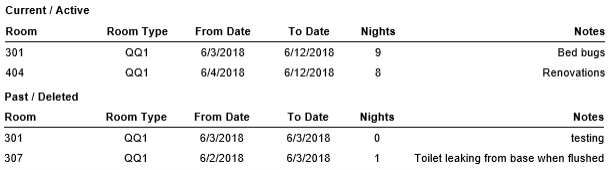
When printing the report, you may choose to include or exclude either out-of-order items or maintenance requests. If printing both options, out-of-order items will be displayed on the first page(s). All pages that show out-of-order rooms will have the following header:

Expand each of the below items as needed for more information on a given column. For ease of reference, out-of-order item will be abbreviated to OOO whenever referenced.
Report Breakdown - Maintenance RequestsThe below report was printed over a 30-day period with past records omitted for maintenance requests,
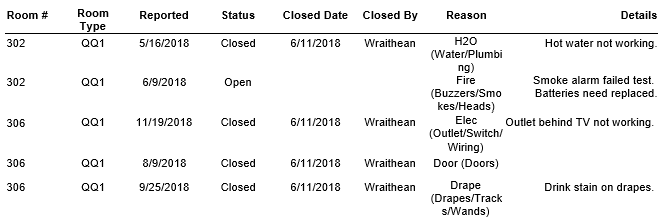
When printing the report, you may choose to include or exclude either out-of-order items or maintenance requests. If printing both options, maintenance requests will be displayed on the first page following the last page of out-of-order items. All pages that show out-of-order rooms will have the below header. Notice also that any additional filters selected when printing will only be displayed on the Maintenance Requests portion of the report, as there are no additional filters that apply to out-of-order rooms.

Expand each of the below items as needed for more information on a given column:
