Reinstatement
Whenever a guest booking is updated to Cancelled, Checked Out, or No-Show status, it's important to know there is a brief window of opportunity to undo the change if needed. For example, a guest who cancelled calls back shortly stating they've changed their mind and will keep the booking; alternatively, a guest who was flagged as a no-show simply arrives late, and now needs to check-in.
This "brief window" is limited to the same business day the cancellation or no-show occurred. For example, if the guest cancels on January 1st, but then calls back on the 2nd and says they have changed their mind, reinstatement is no longer an option. A new booking will need to be made for the guest, which may result in the guest losing any guaranteed rates or similar options tied to their original booking unless a manager chooses to override the change. However, if the guest changes their mind and calls back on the 1st, we can reinstate the booking with no immediate repercussions (assuming the reserved inventory was not already taken by a new booking in the mean time).
To reinstate a booking, locate and access the cancelled booking or no-show. In the top-left corner of the booking, in the Actions ribbon, click the Reinstate button. The booking will refresh and the status will return to Reservation.
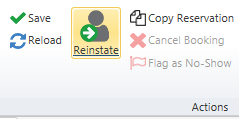
Note that if the reinstate button is "grayed out" and cannot be selected, it is too late to reinstate the booking.
