Cancellations
Cancellations are common occurrence with most hotels - anywhere between one and five percent of daily bookings decide not to stay for a variety of reasons. If your property interfaces with a CRS Central Reservations System: Computerized reservation software used to maintain hotel information, inventory, rates, and manage bookings through online mediums via various booking channels (GDS, IBE, OTA, etcetera)., the guest may cancel their stay automatically without any input from you or your property, but otherwise you may need to access the booking and cancel it manually.
Note that this process only applies for guests who have not yet arrived. Furthermore, if you are looking for instructions on how to handle a guest who never arrived, see No-Shows instead.
Why Bother?
Some users may be curious as to why a booking should be cancelled at all. Outside of the obvious reason that the guest won't be showing up and we want everyone to be aware, cancelling a booking frees up the inventory for the booked room type for another guest to reserve. Similarly, several reports in Chorum track bookings versus cancellations to generate and project expected sales and other KPIs Key Performance Indicator: Any statistic or formula used to help calculate and indicate a hotel's performance and progress..
To manually cancel a guest's booking, begin by locating and accessing the desired booking. Then, open the folio menu and make sure the guest's folio is presently at a $0.00 balance. Depending on hotel policy, you may additionally need to post cancellation fees and (or) payments prior to continuing (seeManual Postings as needed). If you aren't sure whether any fees must be posted or not, reach out to your manager for confirmation.
Once all necessary postings have been made and you have confirmed the folio's balance is at $0.00, click the Cancel Booking button located in the top-left corner of the booking, in the Actions ribbon.
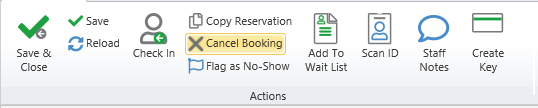
An additional window will open and request a reason for cancellation, based on a list of codes set by your property's management team (see Denial and Cancellation Reasons). Provide an explanation, if applicable.
After completing the reason form, we recommend printing the cancellation form when prompted and (or) forwarding the form to the guest via email (if provided). Afterward, the booking's status will change to Cancelled, indicating your work is complete. Note that for the remainder of the day, this can be undone by reinstating the booking (see Reinstatement). Once the business date has advanced (via audit), the cancellation is considered final and cannot be undone except by making a new booking.
